

What’s a Workflow?
A workflow is the process by which one or more agents get called and actioned on a certain provided content. This flow of actions can generate either files or notifications. For example, some textual notes entered in the system get rewritten in the style of provided templates, and generates a proper output.
Process / Setup
These are the steps to setup a workflow that rewrites provided notes in the style of existing templates, and produces a file in output.
To setup such a workflow, you will need to
- define an agent
- setup a reference collection with templates
- optional: setup a specific type of events on which this workflow applies (and not all).
1. Build collection of templates
For the agent to be able to understand the style with which it is supposed to write the new text, you need to provided a collection of examples, i.e. templates. Create a new collection, and upload a few files with example texts. For example, in the case of a police report, this might just be:
💡 Mme Julie MARTIN, conductrice du véhicule de tourisme Peugeot 308, GE-123 456, circulait sur l’avenue des Tilleuls. Parvenue à l’extrémité de cette voie, cette conductrice n’a pas prêté une attention suffisante au trafic provenant de sa gauche. Elle n’a pas respecté les signaux "Cédez le passage" (fig. OSR 3.02) et "Carrefour à sens giratoire" (fig. OSR 2.41.1) placés sur le côté droit de l'intersection.

En effet, elle s’est engagée dans le giratoire, en direction de Bellefontaine, sans accorder la priorité de passage au véhicule de patrouille sérigraphié, lequel arrivait normalement depuis sa gauche et était déjà engagé dans le carrefour giratoire. Le sergent DUPUIS a dû procéder à un freinage d’urgence afin d’éviter une collision.
2. Create Agent
The agent is the core of the process. The agent decides what it will do, which includes deciding of an action plan, what tools to use, and what to produce as textual output.
Despite the apparent complexity, in many scenarios the agent just relies on its “system instruction”. See this as the Excalibur of prompts. It is accessible in the “advanced” tab of the configuration screen.
In the case of Template-Based Rewriting, your system instruction needs to contain the overall goal, any pertinent elements with regards to the tasks (for example structure & style) and above-all instruction about the provided writing guidelines. Example with police reports:
GOAL:
You will be provided with police investigation notes. Based strictly and exclusively on these notes, you must write an official police report in {LANGUAGE}, dated {DATE}.
...

STRUCTURE & STYLE:
- Be exhaustive and precise
- Write in past tense throughout
- Do not use bullet points, headers, titles, or side notes.
...

WRITING GUIDELINES
You will now receive:
- Optional writing guidelines (only follow these if they do not contradict the above rules, do not introduce unnecessary repetitions and use information provided in the notes)
- Investigation notes
- Optional documents and images taken during the investigation.
There is no specific need here to configure access to tool.
3. Configure Workflow
In order to apply the agent to some provided content/notes, you must not configure a workflow. Select the agent you just created in the “Associated agent” dropdown.
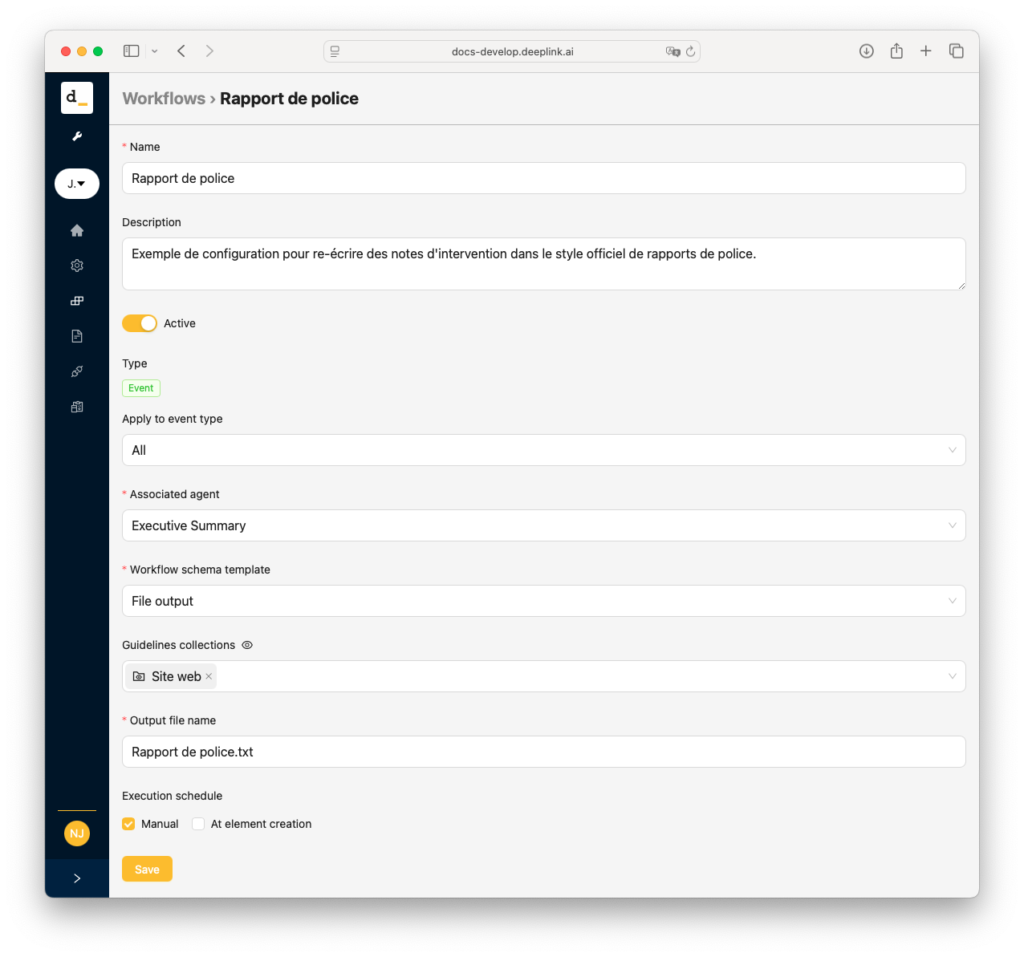
You may restrict this workflow to certain types of events, or trigger on all, as you wish.
The output is a file : you want to produce a new file, the report.
Importantly, you must select in “Guidelines collections” the templates created in step 1. These will be processed by the system and produce a succinct list of guidelines. An eye icon will appear after processing, and show you the computed guidelines. If you with to change them, simply modify and publish your content files in the collection, this will trigger a new set of guidelines. If you prefer to not have guidelines generated, you may untick the option “Generate smart guidelines”, in which case the AI will try to read the whole file(s) as an example.

You also have the option to “store” (i.e. make a copy of) the generated files in a collection. When an event generates that file, it gets copied into the collection with a smart name. If you modify your notes and regenerate the file, it will become a new version of that same file in the collection. You may also choose to publish it automatically upon copy, or not.
4. Ready
You are now ready to create an events with your notes, and generate this document / report according to the style you provided as template.
| Notes | Rapport |
|---|---|
| Constat: Mme Elvine Riond (13.02.1980) complètement bourrée, place de la Neuve, 1263 Crassier. Alcool et peut-être autre substance (marijuana?) Couché par terre sur le rond-point principal, en face église. Danger pour automobilistes. Excuse invoquée: séparation récente, marre de la vie. Avons un peu engueulé personne et fait entendre raison: il faut rentrer. Mme Riond s’est énervé brièvement, mais vite revenu à raison. Rapport à titre préventif si récidive. | Le 2 mai 2025, à une heure non précisée, l’Asp. [Nom de l’Aspirant] et le Gdm. [Nom du Gendarme] ont été informés de la présence de Mme Elvine Riond, née le 13 février 1980, en état d’ébriété avancée sur la place de la Neuve à Crassier. Elle était couchée sur le rond-point principal, en face de l’église, ce qui représentait un danger pour les automobilistes. Les agents ont constaté que Mme Riond était sous l’emprise de l’alcool et potentiellement d’une autre substance, probablement de la marijuana. Elle a invoqué une séparation récente et une lassitude de la vie comme excuses pour son comportement. Les agents ont tenté de la raisonner, lui expliquant la dangerosité de sa situation et l’ont encouragée à rentrer chez elle. Mme Riond s’est brièvement énervée mais a rapidement repris ses esprits. Un rapport a été rédigé à titre préventif en cas de récidive. |